6 · Bake
Bake the sculpt's detail into a normal map and a displacement map on your new UVs, right where you unwrapped them. No round trip to another program.
Where the high-poly comes from
- After a Simplify, the high-poly is the mesh you loaded. Nothing else to do: Atlasmith kept it for the bake.
- Your own low-poly: open it, skip Simplify, unwrap it (or take its UVs with UVs from a file…), then click Load high-poly… in the Bake card and pick the sculpt.
Load high-poly… is also in the Open ▾ menu (Load high-poly for bake…) and in Ctrl+K. Dropping a mesh file on the window while a mesh is loaded asks Open as new mesh or Use as high-poly. The ✕ beside the name drops the high-poly file.
Bake the maps
- Unwrap and pack the low-poly.
- Open the Bake card and set the map size and the options below.
- Click Bake. Progress shows in the status line; Esc cancels.
- The 3D view switches to Normal map and the UV view shows the map.
- Export with Export… (Ctrl+Shift+E): the maps are written next to the mesh.
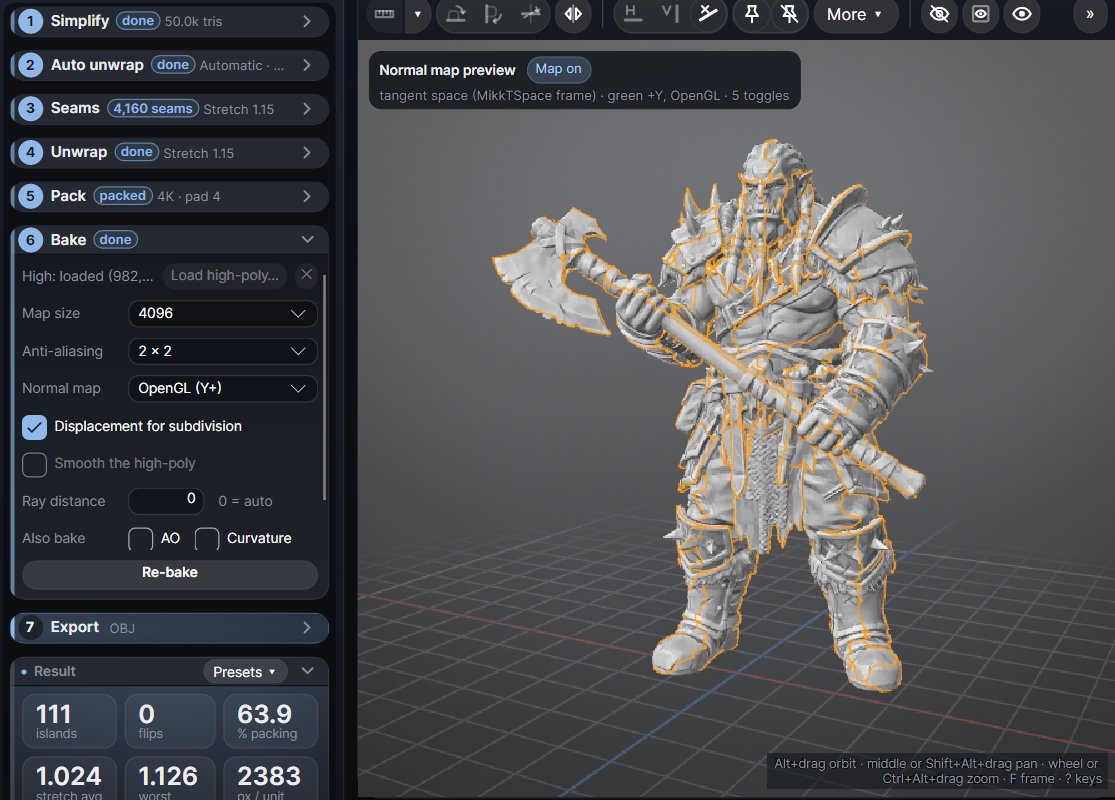
Bake options
| Option | Default | What it does |
|---|---|---|
| Map size | 4096 | 2048, 4096 or 8192. After a Simplify, the island padding is measured at this size. |
| Anti-aliasing | 2 x 2 | Rays per texel: Off, 2 x 2, 3 x 3, 4 x 4. More is smoother and slower. |
| Normal map | OpenGL (Y+) | OpenGL (Y+, green up) or DirectX (Y-, green down). Pick the one your engine or renderer expects. |
| Displacement for subdivision | on | Measure heights from the smooth surface the low-poly gets when subdivided (see below). |
| Smooth the high-poly | off | For a coarse high-poly (below). |
| Ray distance | auto | How far the rays reach out and in from the low-poly, in model units. |
Checking the normal map
After a bake, the 3D view shows the low-poly in the same clay as Shaded, lit with the baked map exactly as it was written, so you see the high-poly detail before you export. A card in the corner names the convention (OpenGL or DirectX). Its Map on button, or Alt+5 again, compares with and without the map.
The UV view's Show list has Normal map and Displacement.
The files
Export writes, next to the mesh:
| File | What it is |
|---|---|
<name>.obj | The low-poly with UVs and the vertex normals the maps were baked against. |
<name>_normal.png | Tangent-space normal map (MikkTSpace-style), OpenGL green unless you chose DirectX. |
<name>_disp.exr | Displacement, 32-bit float, signed height in model units. |
<name>_disp16.png | Displacement, 16-bit, 0.5 = on the surface. |
With several UDIMs, every UDIM gets its own maps: <name>_normal.1001.png, _disp.1001.exr, _disp16.1001.png and so on, with one height scale for all. The UV view shows them side by side; the lit 3D normal-map view needs one UDIM.
Using the displacement
For subdivision or flat
With Displacement for subdivision on (the default), heights are measured from the smooth surface the low-poly gets when subdivided. Use the map on a subdivided mesh: Blender Subdivision + Displace, ZBrush, V-Ray, Arnold. Turn it off to measure from the flat triangles, for height or parallax use on the mesh as it is.
Renderer settings
| Map | Midlevel | Scale |
|---|---|---|
| EXR (32-bit) | 0 | 1 (heights are in model units) |
| 16-bit PNG | 0.5 | 2 × the "displacement ±" range shown in the Result |
Positive heights mean the high-poly lies outside the low-poly's surface. The 16-bit PNG's range is the "displacement ±" value in the Result; rare values beyond it are clipped. Prefer the EXR when your renderer takes it.
Renderers subdivide with Catmull-Clark, the bake measures from a Loop subdivision surface. On a triangle low-poly the two differ slightly; at render subdivision levels the difference is far below the sculpt detail.
Smooth the high-poly
A coarse high-poly (a subdivision cage, a low-res scan) is flat-faceted, and its facets and edge loops show in the maps as stripes, the displacement most of all. Smooth the high-poly (low-res highs) bakes from a smoothed, subdivided copy instead. It is enabled when the high-poly is low-res for the map size; its name then turns orange and a note under the step says so.
Re-bake
After you change a bake option, or repack the layout, Re-bake (or Re-pack + bake) shows on the Result header: Ctrl+P makes the maps for the new layout. A new unwrap drops the old maps.
A project (.atlas) does not keep the baked maps. Export them before closing; Atlasmith asks if you close with a bake that was not exported. The high-poly is stored in the project by its path, and read again when the file still exists.