7 · Export and projects
Export writes the mesh with its UVs and maps for the next program. Save keeps the whole work in one .atlas project, so you can close Atlasmith and continue later exactly where you were.
Export…
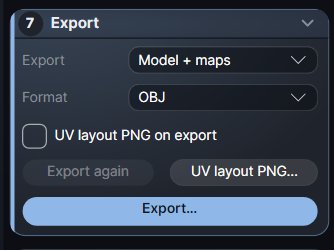
- Open the Export card, pick what to write in Export (Model + maps, Model only or Maps only), pick the Format (OBJ, FBX or Alembic) and tick UV layout PNG on export if you want a picture of the layout.
- Click Export… (Ctrl+Shift+E, or the top bar's Export) and choose the file.
- The status line lists the written files; Open folder shows them in Explorer.
What is written:
- The current mesh (the low-poly after a Simplify) with its UVs. Quads and n-gons of the input are written back whole; normals from the file are written back too.
- After a bake, the normal and displacement maps next to it (see Bake: the files).
- With the option on,
<name>_uv_layout.png. - Once you have cut seams by hand,
<name>_seams.txt, so you can load your seams again later.
Export again (in the card and in Ctrl+K) writes the same files again, with no dialog. If the result was made with earlier options (Result - changed), Export asks before writing.
Formats
| Format | Notes |
|---|---|
| OBJ | The default at every start. Polygons, UVs, normals. |
| FBX | Binary FBX 7.4: one model with the input's polygons, UVs and normals, Y up in centimetres. Materials and animation are not written. |
| Alembic (.abc) | Polygons, UVs and normals. |
Quick export
Quick export (Ctrl+Alt+S, also in Open ▾ and Ctrl+K) is the fast way: no dialog. It writes a copy next to the file you opened, named <name>_UV, in the same format:
C:\work\head.obj → C:\work\head_UV.obj
- It holds the current mesh with its UVs, normals and polygons, as Export writes them; not the maps.
- An STL is written as OBJ (STL has no UVs), and the status says so.
- An earlier
<name>_UVis replaced. The file you opened is never touched.
Saving a project
Save (Ctrl+S) saves the whole work as <name>.atlas. The first time it asks where (next to the mesh by default); after that Ctrl+S saves in place without asking. Save as… is Ctrl+Shift+S.
What a project keeps
- The mesh: positions, triangles, quads and n-gons, polygroups, the file's normals.
- The UVs and islands, all seams (cut by hand, automatic, welded), locks, groups, pins, held edges and the red marks.
- The selection and its mode, hidden and isolated parts.
- The Workflow and Pack options of this file (UDIMs, pack, unwrap, bake, export).
- The paths of the opened mesh and of the bake's high-poly (by path, not embedded).
- Both views: the 3D camera, the up axis, the view mode and overlays, the UV zoom and what it shows, the side panel's tab.
What it does not keep
- The undo history: it starts again when you open the project.
- Baked maps: export them, or bake again after opening.
- The window layout.
A project is compact: a 3.5 million triangle sculpt with its UVs takes about a quarter of the size of its OBJ, and opens in a few seconds.
Unsaved changes
The window title shows the project's name, with a leading • while the work changed since the last save or open (a cut, a weld, U, O, P, a move, locks, groups, pins). A selection, a view or an option alone does not count; nor do Export and Quick export.
Closing the window or opening another file over unsaved changes asks Save / Don't save / Cancel. A bake that was not exported asks too.
Saving is safe: the new file is written first and then takes the old one's name in one step, so a crash or a full disk never leaves you with a broken project. A project from a newer Atlasmith, or a damaged one, is refused with a clear message.
Opening a project
Open…, recent files, a drop on the window, or a double click on the .atlas file (with the Setup) opens it exactly as it was. If the bake's high-poly file still exists, it is read again for the bake.
View only
Without an active license or trial, Export, Export again, Quick export, Save, Save as, Save seams and Bake are not available. See Install and license: view only.