5 · Pack and UDIMs
P lays the islands out in the UV square, or across as many UDIMs as you like, with nothing landing on anything. Pack everything, or only a selection while the rest stays put.
Pack with P
- P packs the selected islands. With nothing selected, it packs every visible island.
- Shift+P packs the same way but keeps every island's rotation.
- Ctrl+P is Re-pack: after you change the size or the padding, it packs everything again with the current settings.
After a pack the UV view frames the UDIMs it packed into. Each pack is one Ctrl+Z step.
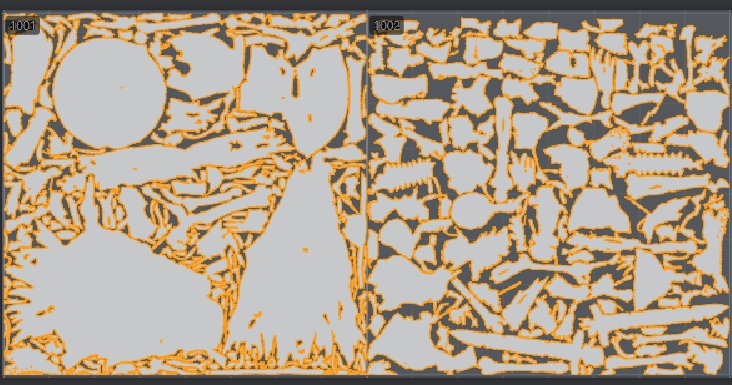
Packing a selection
With anything selected, only those islands move: every other island stays exactly where it is. The selection fills the free space of its UDIM and nests round the islands that stay, with the padding kept. This is how you repack a few islands after a fix without touching a finished layout.
- In Vertex or Edge mode the islands the selection lies on are packed.
- Locked islands, not-flat islands and islands outside the selection are obstacles; nothing lands on them.
- Hidden islands stay where they are but take no room: the packed islands may lie over them, and the status line notes it.
If the selection does not fit, it may shrink down to 25 % of its size; the status says "scaled to N % to fit". Below that, nothing moves and an orange status line says there is no room.
Packing again never shrinks a layout for nothing: the packer tries the islands' present size first and only scales up from there.
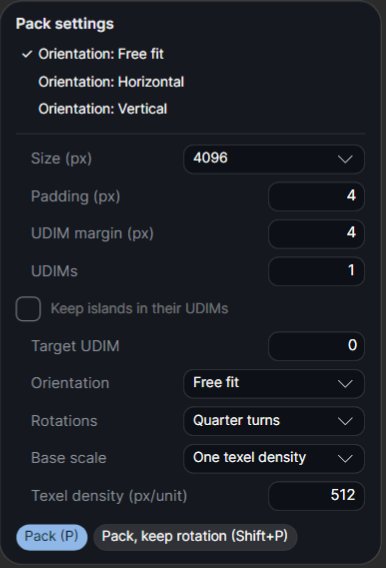
Pack settings
The settings are in the Pack card of the Workflow tab and in the UV bar's Pack ▾; both show the same values. P, Re-pack and Auto unwrap all use them.
| Setting | Default | What it does |
|---|---|---|
| Size (px) | 4096 | The texture size the layout is made for (1024 to 8192). The padding is measured in its pixels. |
| Padding (px) | 4 | The gap between islands, in texels. |
| UDIM margin (px) | 4 | The gap between the islands and the UDIM border. |
| UDIMs | 1 | How many UDIMs to pack into (below). |
| Keep islands in their UDIMs | off | Each island stays in the UDIM it is in; each UDIM is packed on its own. |
| Target UDIM | none | Send the whole selection into this UDIM. |
| Orientation | Free fit | Free fit, Horizontal, Vertical, or 3D Y / Z / X up (below). |
| Rotations | Quarter turns | None (as unwrapped), Quarter turns (islands stay axis-aligned), or Free (also 45° and the best angle). |
| Base scale | One texel density | How islands are sized against each other (below). |
| Texel density (px/unit) | 512 | Used with Base scale Texel density. |
The top of the Pack ▾ card also has three one-click lines: Orientation: Free fit, Horizontal and Vertical.
Orientation
- Free fit: whatever fills best.
- Horizontal / Vertical: each island is turned along its long axis first.
- 3D Y / Z / X up: every island is turned so that axis of the model points up (+V) on it, and keeps that turn. Use it when a grain, fabric or tiling texture must run the same way on every island. It packs a few percent less full.
Base scale and texel density
- One texel density (default): every packed island gets the same texels per model unit, then they are scaled together to fill the space. Islands unfolded at different scales come out even.
- Relative sizes: each island keeps its size against the others; no density fix.
- Keep the sizes: the islands keep their sizes.
- Texel density: packs at the set number of texture pixels per model unit instead of filling, so several meshes match. When the islands do not fit at that density, the UDIMs are filled and the Result says so.
UDIMs
With more than one UDIM, Atlasmith packs into 1001, 1002 and so on, in rows of 10, the way Mari, Substance Painter, ZBrush and Blender read them. Each UDIM is one texture of the chosen size. P fills 1001 first, then 1002, and no island crosses a UDIM border.
The UDIM stepper
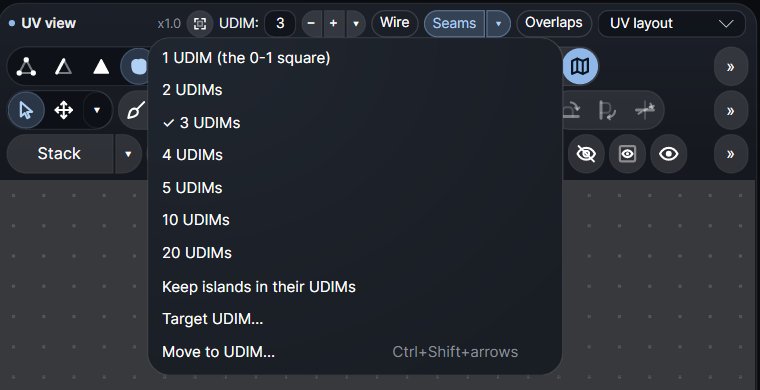
The UV view's title row has the UDIM: [n] [−] [+] [▾] stepper. Type 1 to 100 and press Enter, or step with − and +. Its ▾ offers 1, 2, 3, 4, 5, 10, 20, Keep islands in their UDIMs, Target UDIM… and Move to UDIM….
Changing the count moves no island and is not an undo step; the next P packs into the new UDIMs. The grid never grows by itself: islands outside the chosen UDIMs are drawn where they are, and the stepper's label turns orange to warn you.
Arranging UDIMs by hand
- Ctrl+Shift+arrows move the selected islands to the neighbouring UDIM.
- Island ▾ > Move to UDIM… moves the selection to a typed UDIM.
- Keep islands in their UDIMs then makes P pack each UDIM on its own, for a layout split by hand (the head in 1001, the body in 1002).
- Target UDIM + P puts a spread selection into one UDIM.
The Result shows the packing of the UDIMs that hold islands, with each UDIM's share (for example UDIM 1001 72 % · 1002 68 %). After a bake, every UDIM gets its own maps.
Locking islands
L (or Lock on the UV bar) locks the selected islands, and again unlocks them. A locked island stays exactly where it is: nothing moves, turns, scales, unfolds or relaxes it, and Pack packs round it. It shows a darker clay with a small padlock. A group (G) with a locked island is locked as a whole.
Auto unwrap keeps locked islands too: not cut again, not unfolded, not moved.
Texel density tools
The UV bar's Density ▾:
- Pick (Alt+Q) the texel density of an island, and apply it (Shift+Q) to the selection.
- Average: scales the picked island back to the layout's average density.
- Even (all islands): gives every island the same density and packs them again (locked islands stay).
The Density view (Alt+6) colours each island by its density.
Fit, squarify and pack one island
- Fit to UDIM (Alt+B) and Squarify to UDIM (Shift+B, U and V apart) scale whole islands to their UDIM. Both are in Island ▾.
- Island ▾ > Pack only this puts the picked island into the free space; Pack the rest is the same as P with nothing selected.
- The right-click menu's Pack with nothing selected packs the island it was opened on.